

Problem Statement
You want a simple place to write down what you need to do and tick it off. Nothing here does that yet: the app is a placeholder page.
Solution
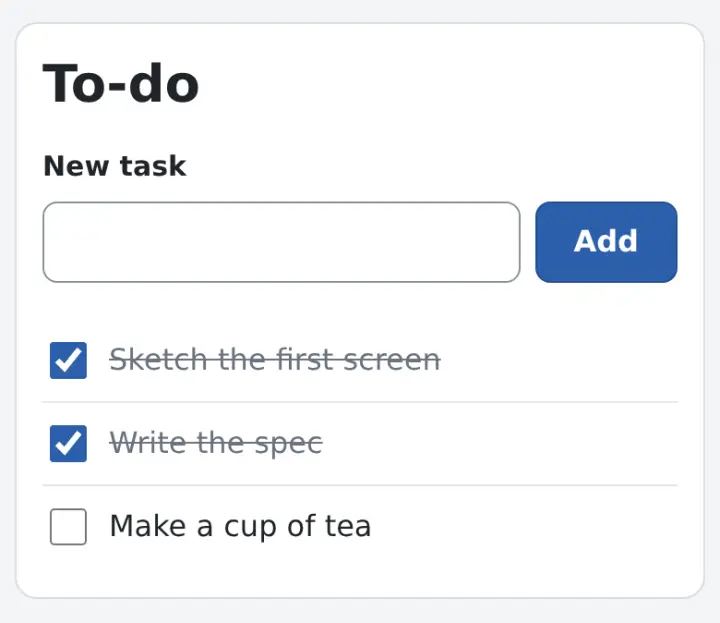
A to-do app in the browser with one list for now. You type a task and add it; it appears in the list. You tick a task to mark it complete: it stays in the list, greyed out, and you can untick it. Your tasks are kept after a reload. The app is a static page on GitHub Pages, with no account and no server: tasks live in your browser.
Changelog headline
A to-do app with one list: add a task, mark it complete (it stays, greyed out), and your tasks are kept after a reload.
User Stories
- As a user, I want to type a task and add it, so that it is in my list.
- As a user, I want an empty task to be refused, so that my list holds only real tasks.
- As a user, I want to mark a task complete, so that I can see what I have done.
- As a user, I want completed tasks to stay in the list, greyed out, so that I can still see them.
- As a user, I want to untick a completed task, so that a mistaken tick is easy to undo.
- As a user, I want my tasks kept after a reload, so that closing the tab loses nothing.
- As a user, I want the app to work on my phone and with the keyboard, so that I can use it anywhere.
Implementation Decisions
- One list for now: no named lists, no list switching. Tasks keep the order they were added in.
- The task list, first (contract-first ticket):
app/todos.jsis a dependency-free ES module of pure functions that every other ticket builds on. A task is{ id, text, done }.addTask(tasks, text)returns a new array with the trimmed text added at the end, or the same array for blank text;toggleTask(tasks, id)flipsdone;loadTasks(storage)andsaveTasks(storage, tasks)read and write onelocalStoragekey,todo-demo.tasks.v1, as JSON, and a missing or unreadable value loads as an empty list.docs/markup.mdfixes the list's markup and class names (the form, the list, one item, its checkbox, and thedonestate) so the view and the styles agree. - The view:
app/view.jsturns tasks into the list's markup asdocs/markup.mdsays, escaping task text. - The page:
app/index.htmlandapp/main.jswire it up: load at start, add on submit, toggle on the checkbox, save after each change, render. - The look:
app/style.css: a calm single column that fits a phone; a completed task greyed out with its text struck through; visible keyboard focus. - No dependencies, no build step. GitHub Pages serves
app/after every merge tomain.
Testing Decisions
npm test(node --test) proves the task list and the view at their module seams:app/todos.jsandapp/view.js, with an in-memory stand-in forlocalStorage.- The page itself has no browser test (no dependencies); it is proven by the live check.
Proof
| Claim | Proof |
|---|---|
| P1. Adding a task appends it; blank text adds nothing | tests/todos.test.mjs, red first |
P2. Toggling flips one task's done and nothing else | tests/todos.test.mjs, red first |
| P3. Tasks saved are the tasks loaded; a missing or broken value loads as empty | tests/todos.test.mjs, red first |
P4. The view marks completed tasks done, checks their box and escapes text | tests/view.test.mjs, red first |
| P5. On the live page: add, complete (greyed out), untick, reload keeps them | The live check below |
Live check
On openwizdev.github.io/todo-demo: add two tasks, mark one complete and see it greyed out, reload and see both with the same states, untick it.
Out of Scope
Several or named lists, editing or deleting a task, due dates, sync between devices, accounts.
Further Notes
Decided in a short grill for "Build a to-do app": its replies are the openwiz.dev landing page's own example answers, recorded as such. Tasks live in one list for now; completed tasks stay visible, greyed out; tasks are kept after a reload, as the landing's spec card says.